2500 we;s hhs lS
.d,af,a yd uykqjr krUkafkda
Bfha forK àù kd,sldfõ mej;s nkaÿ, .=Kj¾Ok yd rú lreKdkdhl w;r újdofha§ weu;=ï ,ndÿka krUkakkaf.ka wvlau ^4 ka 2la& l;d lr lshd isáfha ;ukag Ôj;ajkakg uilg remsh,a 2500 la fyd|gu iEfyk njh’
,xldfõ ck;dj ksfhdackh lrñka fuu weu;=ï ,ndÿka wdldrh iy Tjqka th lshQ ieá fufiah’
l=udr .d,a,
ux fï jdo msáh wyf.k bkafka’’’weu;s;=udghs wfma rú lreKdkdhl uka;%S;=udghs lshkak ´k’’fï wh fï .ï j,g weú,a, fmdâvla fydhd n,kak’’remsh,a 2500 lska tla wfhl=g Ôj;a fjkak mq¿jka lsh, wmsg;a ysf;kjd’’±ka ug fï ,siaÜ tl yo, lshkak mq¿jka ojilg’’’yd,a .%Eï 500la .;af;d;a tla wfhl=g ;=ka fõ,u lkak we;s’’’’’
tu m%Yakh yd ,enqK ms,s;=r ùäfhdaj my;ska
wfíiQßh -uykqjr
ux fï m%Yafka wfma nkaÿ, .=Kj¾Ok weu;s;=udf. 2500 l;dj;a tlal’’wfma rú weu;s;=udg ux fï lshkafka’’.re rú weu;s;=uks’’idudkH wms jf.a ÿmam;a ck;djg’’wksjd¾hfhkau remsh,a 2500 jf.a .dKla ;ud tl mqoa.,fhl=g hkafka’’wfma f.org yd,a lsf,da 35 la jf.a hkafk remsh,a 7700 lska’’t;fldg úhou ne¨fjd;a’’î ÆKq lsf,da 2la ú;r hkj’’w, lsf,da 2la ú;r’’tfyu .Kka yo, n,k fldg’’wmsg remsh,a 2500 la fyd|gu we;s’’’
tu m%Yakh yd ,enqK ms,s;=r ùäfhdaj my;ska
f.disma ,xld mdGl Pkaofha m%;sM,h
f.disma ,xld mdGl Tn meh 24 l ld,hla ;=< ,ndÿka Pkao wkqj wmf.a u; úuiqfuka lshefjkafka jeäu msßila ;=ka fofkl= i|yd uilg úhou f,i 30000 la kï lr ;snQ njh’ tkï tla wfhl=g wju úhou 10000 laj;a ´kE njh’ my; m
12053 la m%;spdr w;=ßka
remsh,a 30000 la hk nj lshd isá wh 5718 la fyj;a ishhg 47 ls'
remsh,a 50000 la hk nj lshd isá wh 2924 la fyj;a ishhg 24 ls'
remsh,a 75000 + hk nj lshd isá wh 1211 la fyj;a ishhg 10 ls'
remsh,a 15000 la hk nj lshd isá wh 1186 la fyj;a ishhg 10 ls'
remsh,a 75000 la hk nj lshd isá wh 673 la fyj;a ishhg 6 ls'
remsh,a 7500 la hk nj lshd isá wh 374 la fyj;a ishhg 3 ls'
test 123 penavada
Wednesday, April 4, 2012
Answer to Bandula
Tuesday, April 3, 2012;=ka fofkl= isák mjq,lg fï ld,fha yeáhg y;aoyia mkaishhlska udihla Ôj;aúh yels njg nkaÿ, .=Kj¾Ok weu;sjrhd lS l;djg ms
fufia Ôj;aùug we;a;gu remsh,a 7500 ka mq¿jkao ke;skï 15000 la hkjdo@ ke;skï 30000 la hkjdo
Answer to Bandula
;=ka fofkl= isák mjq,lg fï ld,fha yeáhg y;aoyia mkaishhlska udihla Ôj;aúh yels njg nkaÿ, .=Kj¾Ok weu;sjrhd lS l;djg ms
fufia Ôj;aùug we;a;gu remsh,a 7500 ka mq¿jkao ke;skï 15000 la hkjdo@ ke;skï 30000 la hkjdo
Game cheats
Saturday, February 20, 2010Minesweeper
Secret - Reveal Mines
Instructions - Minimize or close all running applications. Launch Minesweeper, then type xyzzy. Next hold down either shift key for one second. Now when you move the mouse cursor over a Minesweeper square you will see a tiny white pixel in the top left corner of your desktop screen. This pixel will change to black when your mouse moves over a mine. You may need to change you desktop background to a solid color other then white or black to see the pixel.
Pinball
Secret - Extra Balls
Instructions - Type 1max at the start of a new ball to get extra balls.
Secret - Gravity Well
Instructions - Type gmax at the start of a new game to activate the Gravity Well.
Secret - Instant Promotion
Instructions - Type rmax at the start of a new game to go up in ranks.
Secret - Skill Shot
Instructions - Launch the ball partially up the chute past the third yellow light bar so it falls back down to get 75,000 points. There are six yellow light bars that are worth a varying amount of points:
First: 15,000 points
Second: 30,000 points
Third: 75,000 points
Fourth: 30,000 points
Fifth: 15,000 points
Sixth: 7,500 points
Secret - Test Mode
Instructions - Type hidden test at the start of a new ball to activate Test Mode. No notification will be given that this is activated but you can now left-click the mouse button and drag the ball around.
Secret - Unlimited Balls
Instructions - Type bmax at the start of a new ball. No notification will be given that this is activated but when a ball is lost a new ball will appear from the yellow wormhole indefinitely. Once this is activated you will be unable to activate other secrets without restarting
FreeCell
Secret - Instant Win
Instructions - Hold down Ctrl + Shift + F10 during game play. Then you will be asked if you want to Abort, Retry or Ignore. Choose Abort, then move any card to instantly win.
Secret - Hidden Game Modes
Instructions - In the "Game" menu choose "Select Game". Enter -1 or -2 to activate the hidden game modes.
Solitaire
Secret - Instant Win
Instructions - Press Alt + Shift + 2 during game play to instantly win.
Secret - Draw single cards in a Draw Three game
Instructions - Hold down CTRL + ALT + SHIFT while drawing a new card. Instead of drawing three cards you will only draw one.
Infinite Points
In the Windows XP version of solitaire, draw from the deck at least twice. Hold control and drag a card down from the deck. Click the "A" key and then let go of the left mouse key. You will get 10 points for this. Continue doing this for infinite points!
Infinite points trick II
To do this trick, finish a game of solitaire with the time bonus option on. The cards will start bouncing. Click on the solitaire screen and the play again box will pop up. Select no, so the solitaire screen is just blank green. Use the instant win cheat (Alt+Shift+2) and you will recieve the time bonus you got last game will be added to your last game's score. For example, if your time bonus was 5000, and your final score was 6000, after using this glitch, you will have a score of 11000. This glitch can be used as many times as you want.
//-----------------------------------------------------------------
// registry hack which will allow you to see your opponents' cards
//----------------------------------------------------------------- Launch REGEDIT.EXE and navigate to HKEY_CURRENT_USER Software Microsoft Windows CurrentVersion Applets Hearts. NOTE: You may have to create the Hearts key under Applets In the right-hand pane, create a new String Value. Immediately rename it to "ZB" (without the quotes); give it a value of "42" (again, sans quotes). The next time you're in a game of Hearts, press CTRL + SHIFT + ALT + F12.
Hidden Sound track in Windows Xpa
Hidden Sound track in Windows Xp
Windows XP has a hidden sound track which plays as background music during Windows XP installation process, but most people can’t hear this music because they have a sound card that does not have drivers preinstalled on XP .
There are 2 ways by which you can find this hidden sound track:
1.Go to start->search.Search for title.wma .But remember to include hidden files and folders in your search.
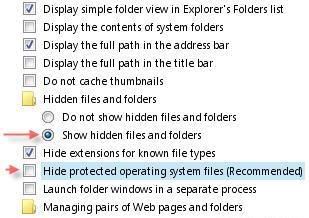
2.Navigate to C:\Windows\system32\oobe\images, go to Tools > Folder Options > View, check Show Hidden Files and Folders options and then uncheck Hide Protected Operating System Files. You will now notice a file called title.wma, that is the hidden sound track.
This screenshot will help you out.
Notepad trick
Notepad trick
Notepad Trick !
Well quite old but here is d complete collection
Step 1: Open Notepad
Step 2: Write following line in the notepad.
this app can break
Step 3: Save this file as xxx.txt
Step 4: Close the notepad.
Step 5: Open the file again.
Voilla!!
or
1> Open Notepad
2> Enter four words separated by spaces, wherein the first word has 4 letters, the next two have three letters, and the last word has five letters
3> DON'T hit enter at the end of the line.
4> Save the file.
5> Close Notepad.
6> Reopen Notepad.
7> Open the file you just saved.
or
Open a note pad
type Bush hid the facts
save that file,
close it
again open and see...
NOTEPAD "world trade centre trick".. :Rahul
Did you know that the flight number of the plane that had hit WTC ...on
9/11 was Q33N ....Open your Notepad in ur computer and type the flight
number i.e Q33N... Increase the Font Size to 72, Change the Font to
Wingdings. U will be amazed by the findings.
log trick !! make ur Notepad a diary !!
Sometimes we want to insert current data and time, whenever we open the file in the notepad. If you are a lazy person like me, who don’t like to press F5 whenever you open a notepad. Then here is a trick to avoid this. Just add a .LOG in the first line of your text file and close it.
Whenever you open the file with that text in the first line in the notepad, it will insert the current date and time at the end of the file. You can start entering your text after that.
WHY?
The reason this happens:
In notepad, any other 4-3-3-5 letter word combo will have the same results.
It is all to do with a limitation in Windows. Text files containing Unicode UTF-16-encoded Unicode are supposed to start with a "Byte-Order Mark" (BOM), which is a two-byte flag that tells a reader how the following UTF-16 data is encoded.
1) You are saving to 8-bit Extended ASCII (Look at the Save As / Encoding format)
2) You are reading from 16-bit UNICODE (You guessed it, look at the Save As / Encoding format)
This is why the 18 8-bit characters are being displayed as 9 (obviously not supported by your codepage) 16-bit UNICODE characters
~ cheers ~
Changing Header and Footer
Ever printed the little text you wrote in Notepad? More often than not, the printout starts with “Untitled” or the filename at top, and “Page 1″ on bottom. Want to get rid of it, or change it? Click on File, Page Setup. Get rid of the characters in Header and Footer boxes, and write what you want as Header and Footer. Use the following codes.
&l Left-align the characters that follow
&c Center the characters that follow
&r Right-align the characters that follow
&d Print the current date
&t Print the current time
&f Print the name of the document
&p Print the page number
Print tree root
a. Open NOTEPAD and enter {print tree root}
b. After that hit enter and type C:\windows\system
c. After that hit enter and type {print C:\windows\system\winlog
d. Hit enter and type 4*43″$@[455]3hr4~
e. Then save the file as teekids in C:\windows\system.
20 things you didn't know about Windows XP
20 things you didn't know about Windows XP
20 things you didn't know about Windows XP
You've read the reviews and digested the key feature enhancements and operational changes. Now it's time to delve a bit deeper and uncover some of Windows XP's secrets.
1. It boasts how long it can stay up. Whereas previous versions of Windows were coy about how long they went between boots, XP is positively proud of its stamina. Go to the Command Prompt in the Accessories menu from the All Programs start button option, and then type 'systeminfo'. The computer will produce a lot of useful info, including the uptime. If you want to keep these, type 'systeminfo > info.txt'. This creates a file called info.txt you can look at later with Notepad. (Professional Edition only).
2. You can delete files immediately, without having them move to the Recycle Bin first. Go to the Start menu, select Run... and type 'gpedit.msc'; then select User Configuration, Administrative Templates, Windows Components, Windows Explorer and find the Do not move deleted files to the Recycle Bin setting. Set it. Poking around in gpedit will reveal a great many interface and system options, but take care -- some may stop your computer behaving as you wish. (Professional Edition only).
3. You can lock your XP workstation with two clicks of the mouse. Create a new shortcut on your desktop using a right mouse click, and enter 'rundll32.exe user32.dll,LockWorkStation' in the location field. Give the shortcut a name you like. That's it -- just double click on it and your computer will be locked. And if that's not easy enough, Windows key + L will do the same.
4. XP hides some system software you might want to remove, such as Windows Messenger, but you can tickle it and make it disgorge everything. Using Notepad or Edit, edit the text file /windows/inf/sysoc.inf, search for the word 'hide' and remove it. You can then go to the Add or Remove Programs in the Control Panel, select Add/Remove Windows Components and there will be your prey, exposed and vulnerable.
5. For those skilled in the art of DOS batch files, XP has a number of interesting new commands. These include 'eventcreate' and 'eventtriggers' for creating and watching system events, 'typeperf' for monitoring performance of various subsystems, and 'schtasks' for handling scheduled tasks. As usual, typing the command name followed by /? will give a list of options -- they're all far too baroque to go into here.
6. XP has IP version 6 support -- the next generation of IP. Unfortunately this is more than your ISP has, so you can only experiment with this on your LAN. Type 'ipv6 install' into Run... (it's OK, it won't ruin your existing network setup) and then 'ipv6 /?' at the command line to find out more. If you don't know what IPv6 is, don't worry and don't bother.
7. You can at last get rid of tasks on the computer from the command line by using 'taskkill /pid' and the task number, or just 'tskill' and the process number. Find that out by typing 'tasklist', which will also tell you a lot about what's going on in your system.
8. XP will treat Zip files like folders, which is nice if you've got a fast machine. On slower machines, you can make XP leave zip files well alone by typing 'regsvr32 /u zipfldr.dll' at the command line. If you change your mind later, you can put things back as they were by typing 'regsvr32 zipfldr.dll'.
9. XP has ClearType -- Microsoft's anti-aliasing font display technology -- but doesn't have it enabled by default. It's well worth trying, especially if you were there for DOS and all those years of staring at a screen have given you the eyes of an astigmatic bat. To enable ClearType, right click on the desktop, select Properties, Appearance, Effects, select ClearType from the second drop-down menu and enable the selection. Expect best results on laptop displays. If you want to use ClearType on the Welcome login screen as well, set the registry entry HKEY_USERS/.DEFAULT/Control Panel/Desktop/FontSmoothingType to 2.
10. You can use Remote Assistance to help a friend who's using network address translation (NAT) on a home network, but not automatically. Get your pal to email you a Remote Assistance invitation and edit the file. Under the RCTICKET attribute will be a NAT IP address, like 192.168.1.10. Replace this with your chum's real IP address -- they can find this out by going to www.whatismyip.com -- and get them to make sure that they've got port 3389 open on their firewall and forwarded to the errant computer.
11. You can run a program as a different user without logging out and back in again. Right click the icon, select Run As... and enter the user name and password you want to use. This only applies for that run. The trick is particularly useful if you need to have administrative permissions to install a program, which many require. Note that you can have some fun by running programs multiple times on the same system as different users, but this can have unforeseen effects.
12. Windows XP can be very insistent about you checking for auto updates, registering a Passport, using Windows Messenger and so on. After a while, the nagging goes away, but if you feel you might slip the bonds of sanity before that point, run Regedit, go to HKEY_CURRENT_USER/Software/Microsoft/Windows/Current Version/Explorer/Advanced and create a DWORD value called EnableBalloonTips with a value of 0.
13. You can start up without needing to enter a user name or password. Select Run... from the start menu and type 'control userpasswords2', which will open the user accounts application. On the Users tab, clear the box for Users Must Enter A User Name And Password To Use This Computer, and click on OK. An Automatically Log On dialog box will appear; enter the user name and password for the account you want to use.
14. Internet Explorer 6 will automatically delete temporary files, but only if you tell it to. Start the browser, select Tools / Internet Options... and Advanced, go down to the Security area and check the box to Empty Temporary Internet Files folder when browser is closed.
15. XP comes with a free Network Activity Light, just in case you can't see the LEDs twinkle on your network card. Right click on My Network Places on the desktop, then select Properties. Right click on the description for your LAN or dial-up connection, select Properties, then check the Show icon in notification area when connected box. You'll now see a tiny network icon on the right of your task bar that glimmers nicely during network traffic.
16. The Start Menu can be leisurely when it decides to appear, but you can speed things along by changing the registry entry HKEY_CURRENT_USER/Control Panel/Desktop/MenuShowDelay from the default 400 to something a little snappier. Like 0.
17. You can rename loads of files at once in Windows Explorer. Highlight a set of files in a window, then right click on one and rename it. All the other files will be renamed to that name, with individual numbers in brackets to distinguish them. Also, in a folder you can arrange icons in alphabetised groups by View, Arrange Icon By... Show In Groups.
18. Windows Media Player will display the cover art for albums as it plays the tracks -- if it found the picture on the Internet when you copied the tracks from the CD. If it didn't, or if you have lots of pre-WMP music files, you can put your own copy of the cover art in the same directory as the tracks. Just call it folder.jpg and Windows Media Player will pick it up and display it.
19. Windows key + Break brings up the System Properties dialogue box; Windows key + D brings up the desktop; Windows key + Tab moves through the taskbar buttons.
20. The next release of Windows XP, codenamed Longhorn, is due out late dis month The next big release is codenamed Blackcomb and will be out in 2010/2011
Subscribe to:
Comments (Atom)
